
Why Won’t My IoT Device Connect to WiFi? Full Troubleshooting Guide

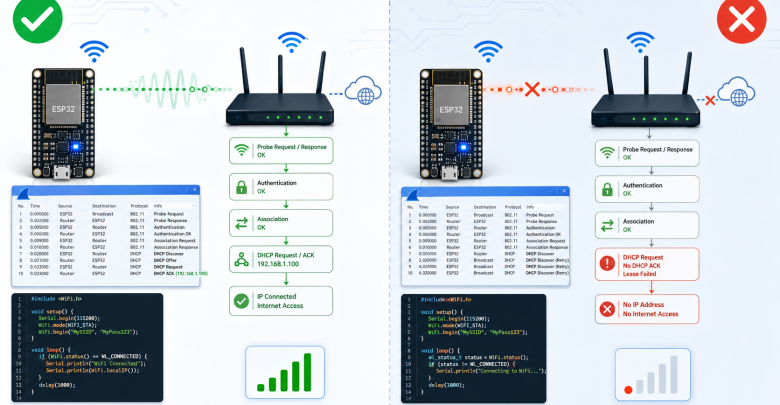
Struggling with constant WiFi disconnects in your IoT or ESP32 project? This guide walks you through hardware and firmware troubleshooting step by step.
Why Won’t My IoT Device Connect to WiFi?
If you’ve ever worked on an IoT project with a team, this scenario probably sounds familiar: the network engineer says “the signal is perfect, the handshake is clean,” while the firmware engineer insists “the reconnect logic follows the spec exactly.” Meanwhile, the ESP32 board just sits there, blue LED blinking, connected to absolutely nothing.
WiFi connectivity issues in IoT devices are rarely one-sided. In this guide, we’ll walk through where the problem usually comes from and how to fix it.
1. First: Is It a Hardware or Firmware Problem?
Before anything else, narrow down which side the issue is on:
- If the device doesn’t scan networks at all → likely an antenna or WiFi module issue.
- If it connects but drops quickly → usually a power management or reconnect-logic issue in firmware.
- If it fails to connect intermittently → often related to DHCP leases or router settings.
2. Essential Troubleshooting Tools
- Wireshark: capture packets on both the router side and simulate the device side.
- Serial Monitor: check firmware logs during connection attempts.
- RSSI logging: many “random disconnect” issues are actually signal drops caused by distance or interference-heavy environments.
3. Common Firmware Mistakes
- Not implementing proper exponential backoff on reconnect attempts.
- Mishandling stored credentials after a factory reset.
- Blocking the event loop during reconnection attempts, which can trigger a watchdog reset.
4. Common Network Mistakes
- Setting DHCP lease times too short, causing IP conflicts with multiple devices.
- WiFi channel interference with other devices in industrial environments.
- Client limits on cheap access points that cap simultaneous connections.
Conclusion
IoT connectivity issues are usually the result of several small factors combined, not one big bug. The best approach is logging both sides (network and firmware) simultaneously and comparing event timestamps.
Frequently Asked Questions (FAQ)
Does the ESP32 only support 2.4GHz WiFi? Yes, most common ESP32 modules only support the 2.4GHz band, not 5GHz.
Why does my device fail to connect only sometimes? This is usually due to signal interference, weak antenna performance, or incorrect DHCP settings on the router.
What’s the best free tool for network analysis? Wireshark is excellent for packet analysis, while nRF Connect or WiFi Analyzer are good for checking signal strength.
#IoT #EmbeddedSystems #WiFi #Firmware #Networking #ESP32 #IoTJournal